SVG and DXF Exporter Now Available in the Teacher Dashboard
Makers Empire has introduced a new SVG and DXF exporter that lets students and teachers turn their 3D creations into precise 2D vector files — perfect for laser cutters, Cricut machines, and other digital fabrication tools.
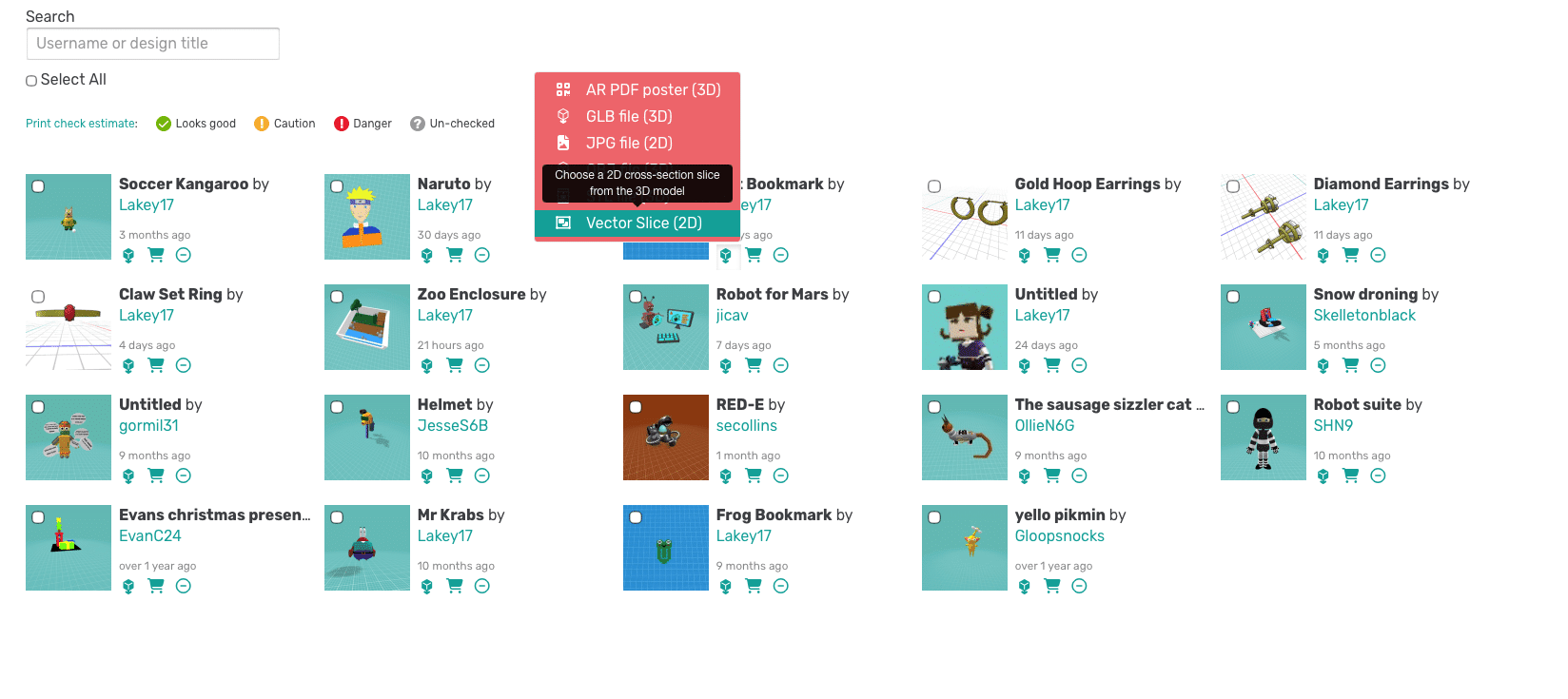
Hover over the download icon next to any of your designs
Select Vector Slice (2D)
This opens the new Vector Slice interface.
Customizing Your Slice
The Vector Slice page gives you full control over how your 3D model is converted into clean, scalable vector contours.
You can:
Choose SVG or DXF format
Select the slice axis (X, Y, or Z)
Adjust the slice position using a slider
Mirror the slice
Download a single slice or three orthographic projections
The preview shows both the 3D slice plane and the 2D vector output, so you know exactly what you’re exporting.
Get Creative
Laser cutters can use these files to cut or etch designs from wood, acrylic, cardboard, and more
Cricut and Silhouette machines can turn Makers Empire models into stickers, stencils, decals, and templates
Students can extend their 3D design projects into hands-on fabrication, bridging digital creativity with physical making
Teachers gain a new workflow for STEAM, design thinking, and rapid prototyping
This new feature opens up endless possibilities for classrooms and makerspaces. From custom nameplates and ornaments to engineering prototypes and art projects. Take your designs from an idea to a finished product with Makers Empire’s fun and easy to use tools.
Happy designing!
Please wait while you are redirected to the right page...